pdfCompress

pdfCompress
License:
Demo
Language:
English
Developer:
Developer's website
OS:
Mac OS X
Updated:
See detailed info

Softonic review

Nick Mead

“Reduce the size of your PDF files instantly”

by Nick Mead about pdfCompress

PDF files are one of the best ways to distribute documents across the Net, but they can get rather large, especially as images and other graphics are added.

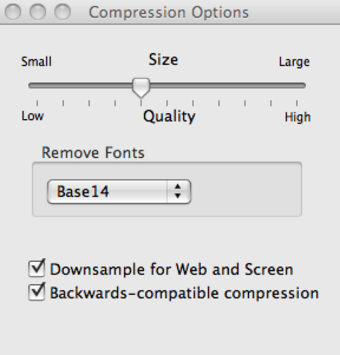
This can sometimes cause problems sending them by email, or it can just take up valuable storage space, so the best solution is to compress them. pdfCompress does this for you via a simple drag-and-drop method. The resulting file can then be sent via email with no need for the recipient to have pdfCompress installed. pdfCompress features a wide variety of compression methods such as LZW, Flate, JPEG, font removal, CCITTT Group 4, dead-object stripping and metadata removal so if you have problems with one, you should be able to revert to another no problem.

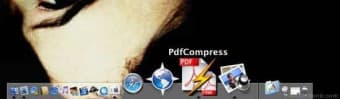
To use pdfCompress, simply drag and drop the PDF document of your choosing into the PDF icon in your Dock. A small progress bar will show you the status of your conversion, although it doesn't stay on the screen for very long. pdfCompress automatically chooses the most appropriate compression rate for your file, although depending on the content inside your document, it doesn't necessarily mean it will work the best. Don't worry about your original file - pdfCompress never modifies it and labels compressed files so that it's clear which have and have not been compressed. There is a small preference panel which with a sliding bar, allows you to select the level of compression that you need.

Although pdfCompress doesn't shave much off your original files (I reduced a 1MB file to 866KB), it is a very fast and simple way to reduce the size of your PDF files.

Pros
  • Reduces Pdf files very quickly and simply
  • Easy to use
  • Variable compression ratios
Cons
  • Doesn't reduce the size by large amount
Download pdfCompress

Review and rate pdfCompress

Your avatar

Your opinion is important.
Help other users - be the first to review this program.

Review
  1. Maximum: 75 characters

  2. See example

Pros and Cons
Rate
  1. What rating would you give pdfCompress?

    You need to fill in all fields

    • Usability:

      Not rated
    • Stability:

      Not rated
    • Installation:

      Not rated
    • Functionality:

      Not rated
    • Appearance:

      Not rated
    • Overall rating:

      Not rated
  2. Don't worry, we won't make your email address public.

You're not allowed to share serial numbers, cracks, etc. or link to pages that contain them. If you do, your user account will be deleted, your IP address logged and legal action will be taken.

Get started - just ask a question!

Write a title for your question.

Alternativesto pdfCompress

  • In English:
    CleanArchiver
    CleanArchiver

    A nifty archiving utility

    Softonic rating:
    • 8/10
    User rating:
    • 10/10
  • Free:
    Hamster Archiver
    Hamster Archiver

    Free archive utility for OS X

    Softonic rating:
    • 8/10
    User rating:
    • 10/10
Compare with pdfCompress

Screenshots from pdfCompress

Download rank: Compression

16 of 42

Softonic rating:
  • Good
  • 7/10
Your rating:
Your rating
  • 0

Review and rate this program

Top Downloads: Compression

  • United States
  • Global

  1. The closest thing to WinRAR for Mac

Older versions of pdfCompress

Reviews of pdfCompress in other languages